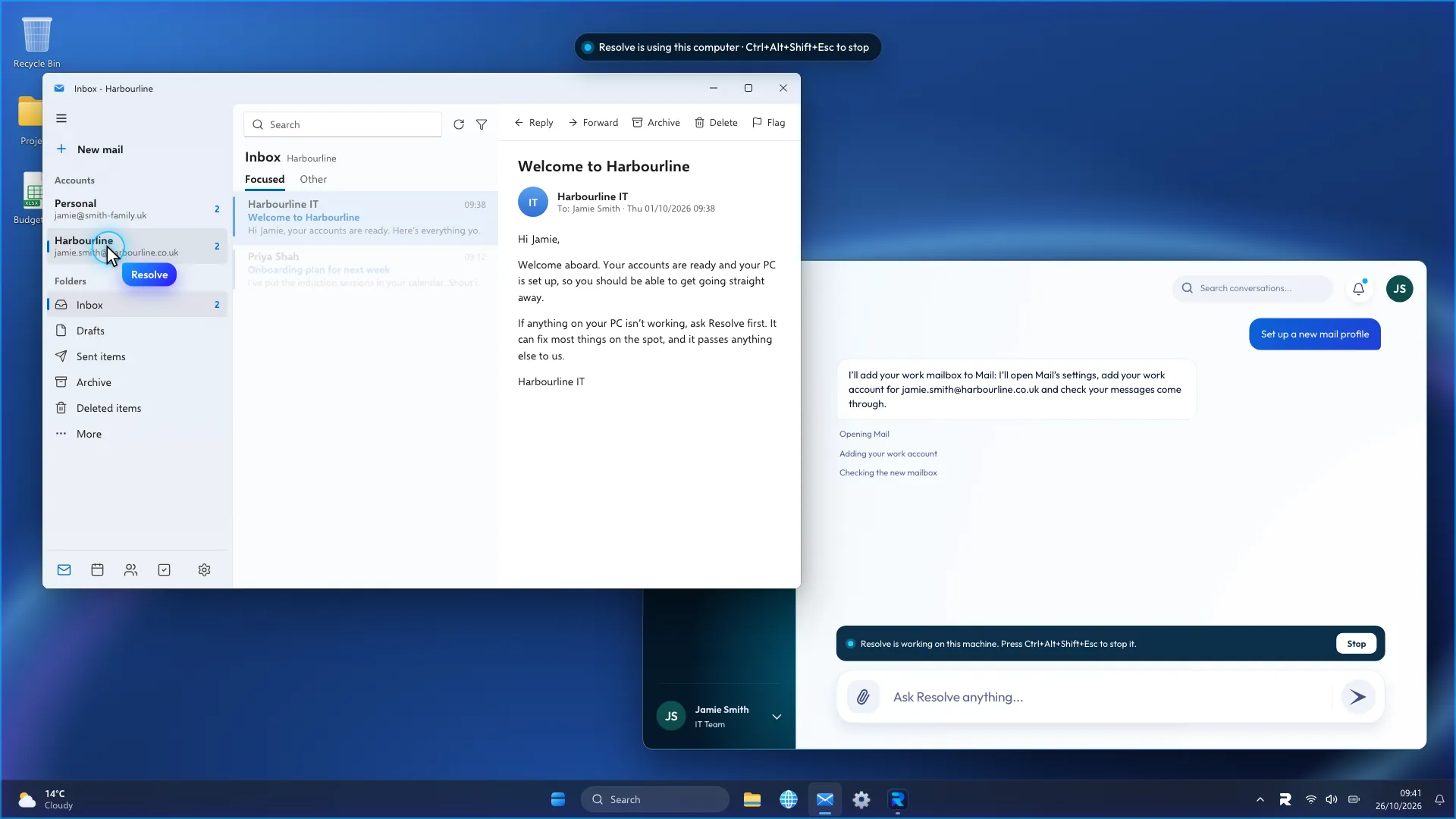
In your PSA
It triages and assigns new tickets, works them on the requester’s own computer once they say yes, and writes its notes back before it closes or escalates.
Resolve is an AI helpdesk engineer for IT teams and MSPs. It works L1 tickets in your PSA and on the user’s device.
 IT Glue
 Notion


 Microsoft Teams


 Jira


 Confluence
 Autotask
 Zendesk
 Microsoft Intune
 SharePoint

 Freshservice
 Entra ID
It triages and assigns new tickets, works them on the requester’s own computer once they say yes, and writes its notes back before it closes or escalates.
When the fix is on the user’s Windows PC or Mac, it fixes it there and writes up what it found.
Users report problems the usual way and Resolve picks up the repetitive ones.
It searches your documentation and past tickets before it changes anything.
It works in the PSA or on the device, and hands anything risky to an engineer.
Before it acts, it pulls up past tickets for the same user and device alongside your runbooks.
Some tickets only need routing to the right team, some need the user’s computer and some need a person.
Whoever picks the ticket up next can see each check it ran and each change it made.
Each kind of change can run on its own, wait for your approval or go straight to an engineer.
Resolve reads your documentation and PSA where they already are. Nothing has to be copied or moved.
It works through the steps in your own runbooks instead of a generic support article.
Ticket history, documentation, Intune, Entra ID and the event logs on the machine.
It reads the ticket, compares your runbooks and starts from the one that matches.
Runbooks and client notes it reads before it acts.
Triage, routing, replies, work notes and time entries.
Account and device details it checks while it investigates.
Device health and alerts it looks at before it touches the machine.
Where people report a problem and get replies.
Windows and macOS. Resolve uses the machine itself, with the mouse and keyboard.

My files stopped syncing to OneDrive.
On the device Resumes the paused OneDrive sync.

Outlook won’t open after the update.
On the device Rebuilds the Outlook profile and checks mail syncs.
The S: drive is missing on my laptop.
On the device Re-adds the drive mapping for this user.
The printer on the second floor shows offline.
On the device Cancels the stuck print jobs and prints a test page.
My laptop takes ten minutes to start.
To an engineer Writes up what it found and hands it over.
I need access to the finance share.
To an engineer Access needs approval, so it goes to an engineer.
Teams keeps signing me out.
On the device Clears the Teams cache and the user signs back in.
Anything that needs elevation, a server or Active Directory goes to one of your engineers.
Block apps and websites for one client without touching the others.
A banner and a Stop button stay up the whole time, and a hotkey stops it at once.
The engineer gets what it checked and tried, a screenshot and the transcript.
Anything else? [email protected]
Resolve is an AI helpdesk engineer for internal IT teams and MSPs, built to do the job of a level 1 engineer. It works tickets in your PSA and on the user’s device, and it is in private beta.
Inside the PSA, Resolve triages and categorises new tickets, setting the type, priority and board, and routes and assigns each one to the right engineer or team. It replies to the user in the ticket and writes work notes, summaries and time entries back. When a ticket can be fixed on the requester’s own computer, it picks it up and works it there through the Resolve app; the person is told first and can stop it at any time. Then it resolves and closes the ticket, or escalates it to an engineer with notes on what it checked and tried. Connectors for ConnectWise, Autotask, HaloPSA, ServiceNow, Jira Service Management, Zendesk and Freshservice are being built during the beta.
A chatbot answers the user, and a ticketing AI assistant stays inside the PSA. Resolve does the PSA work, from triage to the time entry, and when the problem is on the user’s computer it goes onto the device and fixes it there. Anything it should not attempt alone goes to an engineer with what it found written down.
In your PSA, new tickets that need triage, routing and assignment, and tickets that can be fixed on the requester’s own computer. On the device, the tickets that fill a level 1 queue: Office and Microsoft 365 errors, printer problems, drive mappings, VPN drops and slow machines. Anything outside that set, or anything it should not attempt alone, goes to an engineer.
It hands the ticket to a human engineer with what it found and every step it has already taken written down. Anything risky, ambiguous or needing approval is escalated rather than attempted, and Resolve stays inside the guardrails you set. Your engineer picks up a ticket that has already been investigated rather than a one-line complaint.
Resolve is being built to connect to the documentation and ticketing systems you already run, so it understands your environment before it acts. Documentation in IT Glue, Hudu, Confluence, SharePoint and Notion. Ticketing and PSA in ConnectWise, Autotask, HaloPSA, ServiceNow, Jira Service Management, Zendesk and Freshservice. Identity and devices in Microsoft Entra ID and Intune. Remote monitoring in NinjaOne and Datto RMM. Chat in Microsoft Teams and Slack. More are being added during the beta.
Resolve is in private beta. Join the waitlist with your work email and we will be in touch as places open up. Early access is going to internal IT teams and MSPs who want help with the tickets that fill their level 1 queue. You can also reach us at [email protected].